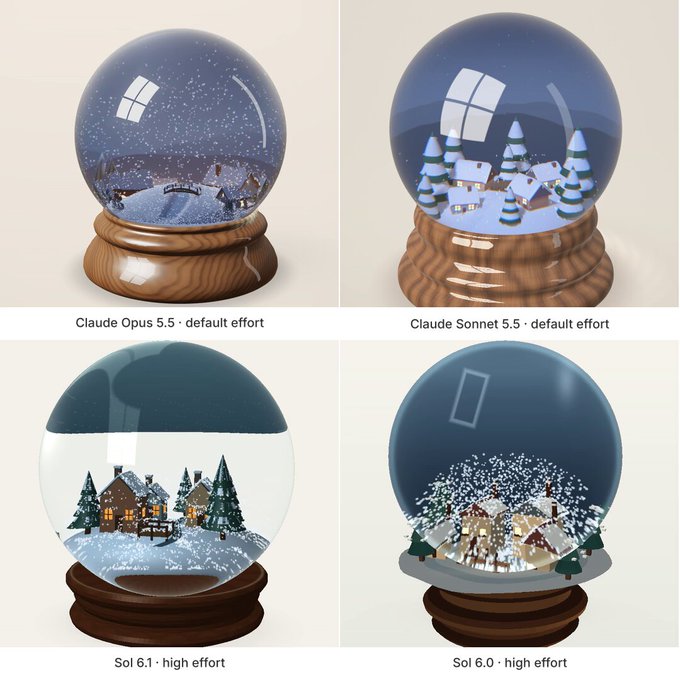
Create "Snow Globe" — a beautiful, interactive 3D snow
globe that users can shake and watch settle in their
browser. Deliver one complete standalone HTML file using
genuine WebGPU with WGSL shaders.
ART DIRECTION
- A glass sphere on a turned wooden base, large and
centered, on a warm off-white background with soft
studio lighting and a subtle ground shadow.
- Inside: a tiny procedural winter village — three or
four cottages with pitched roofs and softly glowing
windows, a few layered pine trees, a small footbridge,
and a snow-covered ground mound.
- The glass should read as real glass: refraction that
visibly bends the village at the edges, Fresnel
reflections, a crisp window-shaped highlight, and a
faint rim caustic on the base.
- Mood: cozy, quiet, a little magical. Keep it elegant
and uncluttered.
GEOMETRY
- Generate all geometry procedurally. No external models,
textures, or image files.
- The village must sit fully inside the sphere with
nothing clipping through the glass.
- Snowflakes are small, soft, slightly varied flakes, not
uniform dots. Include a toggle for sparse glitter
flecks that catch the light.
SNOW AND WATER PHYSICS
- Simulate several thousand snow particles on the GPU in
a compute shader.
- Shaking the globe moves the water: particles swirl in
vortices, trail behind the motion, and slosh back when
the shake reverses. Use a simple fluid velocity field
or curl-noise flow driven by the globe's motion, not
independent random drift.
- After shaking, flakes slow down, drift, flutter, and
settle over roughly 10–20 seconds.
- Settled snow accumulates on roofs, tree branches, and
the ground, and is knocked loose by the next shake.
- Particles must never escape the sphere or pass through
the village. Use fixed simulation steps and bounded
velocities so violent shaking stays stable.
INTERACTION
- Click-drag or touch-drag the globe to shake it; faster
drags produce stronger swirls, and the globe itself
tilts and springs back.
- On mobile, a "Use motion" button requests device-motion
permission (required on iOS) and lets the user shake
the phone.
- Right-drag or two-finger drag orbits the camera, with
limited zoom. Keep camera gestures separate from
shaking.
CONTROLS
- Give it a shake (auto-shake button)
- Reset, Reset view, Pause
- Snow amount slider
- Water thickness slider (how slowly flakes fall)
- Glitter toggle
- ¼ speed toggle
- Three scenes: Alpine Night, Cabin Dawn, Northern Lights
(aurora glow in the sky dome inside the globe).
Switching scenes must not reset the snow.
INTERFACE
- Top left: small "MATERIAL STUDIES" label, large italic
serif heading "Snow Globe.", caption "Shake gently.
Wait patiently. Winter keeps."
- Top right: WebGPU status indicator.
- Right side: compact "THE KEEPSAKE" control panel.
- Bottom left: a short interaction hint.
- Clean sans-serif controls, thin borders, generous
whitespace. Adapt to mobile without covering the globe