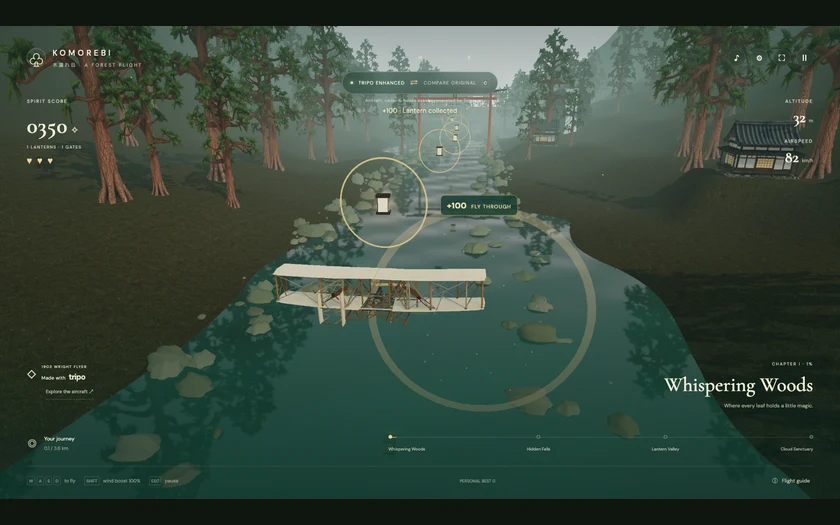
# KOMOREBI — A Forest Flight
## 1. Goal
Keep all game UI in English.
Build a complete browser flight game: pilot a recognizable 1903 Wright Flyer along a Japanese forest river, collect spirit lanterns, pass through torii gates and reach a mountain sanctuary. Use and the supplied references for the finished composition. Credit Jared at and the inspiration, The Bugged Dev, at
## 2. Visual direction
Create a quiet cinematic miniature forest with deep cedar greens, teal water, warm ivory linen, weathered wood, mossy stones and restrained amber light. Frame the aircraft clearly from a smooth rear chase camera, with the next collectible visible over its wings. Use soft sunlight from outside the forward view, ambient fill, contact shadows, misty mountains, water reflections, drifting motes and subtle bloom. Avoid overexposure, floating houses, oversized light blobs and angular rock walls.
Use warm off-white text, thin translucent borders, local Cormorant Garamond-style serif headings and DM Sans-style controls. Top left: KOMOREBI, 木漏れ日 and A FOREST FLIGHT. Put the compass and Compare control above, utility buttons top right, score/hearts left, altitude/airspeed right and chapter progress along the bottom. The opening invitation is “Let the forest carry you.” with “Begin flight”. Compact the overlay on phones without obscuring the plane.
## 3. World
Build a deterministic 3.6 km route with four equally spaced chapters: Whispering Woods, Hidden Falls, Lantern Valley and Cloud Sanctuary. Stream or recycle scenery chunks. A gently winding turquoise river defines the corridor; use x(z) = sin(0.006z) × 19 + sin(0.017z) × 5 as a starting curve. Place torii openings along the assisted flight path, with forest, timber houses, waterfalls, rounded river rocks and misty mountains layered around it. Terrace every house footprint and embed its foundation at all four corners.
## 4. Asset inventory
Prepare stable model slots in this order:
- `aircraft`: open 1903 Wright Flyer, two broad ivory linen wings, exposed slender timber frame, struts and tension wires, front canard and twin rear pusher propellers. Keep the propellers as separate animated parts without duplicate blades.
- `cedar`: tall reddish-brown trunk, irregular layered deep-green foliage, coherent branches and grounded roots; reuse with varied scale and rotation.
- `minka`: dark weathered timber, plaster infill, broad tiled pitched roof, generous eaves, warm shoji windows and stone foundation.
- `torii`: weathered Japanese timber gate with two posts and a broad curved upper lintel; its open passage must match the existing collision envelope.
- `lantern`: warm paper-and-timber spirit lantern; use the same model family for repeated collectibles and smaller decorative lights while making their roles visibly distinct.
- `rock`: rounded mossy river stone with a grounded base; instance it along banks without blocking the flight corridor.
Keep river, terrain, mountains, waterfall sheets, glow rings, mist, particles and UI procedural. List every slot in the registry and update all repeated instances when its model changes.
## 5. Flight and feedback
Move forward automatically after Begin flight. W/S or up/down adjust altitude; A/D or left/right steer and bank. Shift spends a visible, recharging wind-boost reserve. Smooth acceleration and a trailing camera should remain responsive. Default flight assist gently returns toward the river and target altitude after input is released; offer an assist toggle and quality settings. Supply touch steering and boost. Esc pauses; help, settings and the aircraft viewer pause flight and restore the prior state. Clear held input on focus loss.
Give three hearts. Each spirit lantern awards 100 points and a clear torii crossing awards 250, only once per target. Ground, bank and beam collisions remove one heart and grant brief invulnerability. Finish at 3.6 km with score, best and replay; zero hearts offers retry. Store best locally with a storage-failure fallback.
Lanterns sit inside large oval gold collection rings, with bobbing, breathing halos and sparks. Label the nearest target “+100 · FLY THROUGH”. Align its generous hit volume with the animated ring. Pickups produce an expanding ring, warm particles, floating score and a HUD pulse. Fade passed gates before they obscure the chase camera.
## 6. Implementation
Use Vite, Three.js and JavaScript ES modules, separating route/collision/scoring, scenery, models, effects and UI. Bundle dependencies, fonts and runtime assets locally; deliver a static site. Use GLTFLoader and an asset manifest with per-slot bounds, orientation, provenance and fallback factories. Keep collisions independent of imported mesh shape. Rotate the two propellers using delta time; inspect them from the chase camera and an orbitable, zoomable aircraft viewer. Offer a download of the actual local aircraft file when available. Blender is optional for separating baked-in propellers, fixing pivots or baking a lighter mesh if measured performance requires it.
Keep the original visual baseline. Once an imported slot exists, Compare or C switches between that baseline and available replacements, without navigation or resetting flight, camera, hearts, boost, score or pickups. Freeze progression during the transition, retain the last complete frame until the next scene is ready, then crossfade over about 650 ms. Respect reduced motion; guard repeated clicks and restore the prior scene on failure. Use an inline dark startup background, capped DPR, bounded particles and at most two cached scene variants.
## 7. Acceptance
Deliver source, lockfile, npm run dev, npm run build and static dist output. Verify a complete flight, boost, lantern/gate collection, collision immunity, pause/resume, touch controls, replay, viewer and independent slot imports. Check both Compare directions preserve state without white frames or growing GPU resource use. Inspect house grounding, aircraft silhouette, propeller motion, readable lighting and slow-load recovery. Report actual tests and performance conditions. Follow the shared workflow below for asset generation and return.